Creating mobile apps from your website
Turn a Floot web app into real iOS and Android apps — installable on a phone, and submittable to the App Store and Google Play.
Floot converts your project into native iOS and Android apps — the same app you built, wrapped so it can be installed from a device, submitted to the App Store, or published on Google Play.
Your first app build happens in a browser
Open your project on floot.com, click Publish, switch on Publish mobile app and publish. The project link your assistant hands you opens the project view at /mcp-preview/<id>, and the Publish button there is the same screen. Your assistant can start an app build itself only once an Apple or Google Play account is connected to the project. Until then, asking it for a mobile build gets you a card that sends you to floot.com to connect one. The APK and the project zip are downloaded on floot.com either way. Once the app has been built, your assistant can edit the native iOS and Android config files for you. Ask it for the ios-info-plist or android-manifest guide.
Every plan includes app builds
Native app builds are metered per month: 2 on Free, 12 on Pro, unlimited on Power (legacy credit plans of 100k and above are unlimited too). See pricing. A build that fails does not count, and neither does one that every connected store turned away. Connecting Google Play needs a paid plan; Apple works on every plan. If you run out, publishing still succeeds — the web app ships as normal and only the app build is skipped, and the publish tells you so. When the count starts over is under What counts toward your monthly app builds.
How it works
- 1
Build your app as usual
Everything you build for the web comes along. Floot adds the native permissions your app needs on its own: camera and photo access when your app has a file upload or uses the camera, location and microphone when your code uses them, and notifications when you use Floot's push. The default permission wording is generic and Apple rejects it, so before you submit, ask your assistant to write wording that says why your app needs each one — see Native app features.
- 2
Publish with the mobile app switched on
Open your project on floot.com and click Publish. Switch on Publish mobile app, then publish: Continue the first time, when you also pick your subdomain, or Publish update once the app is live. An app build normally rides along with a publish, which also puts your latest changes on the web. To build only the app and leave the website alone, make a test build instead. The switch shows how many app builds you have left this month.
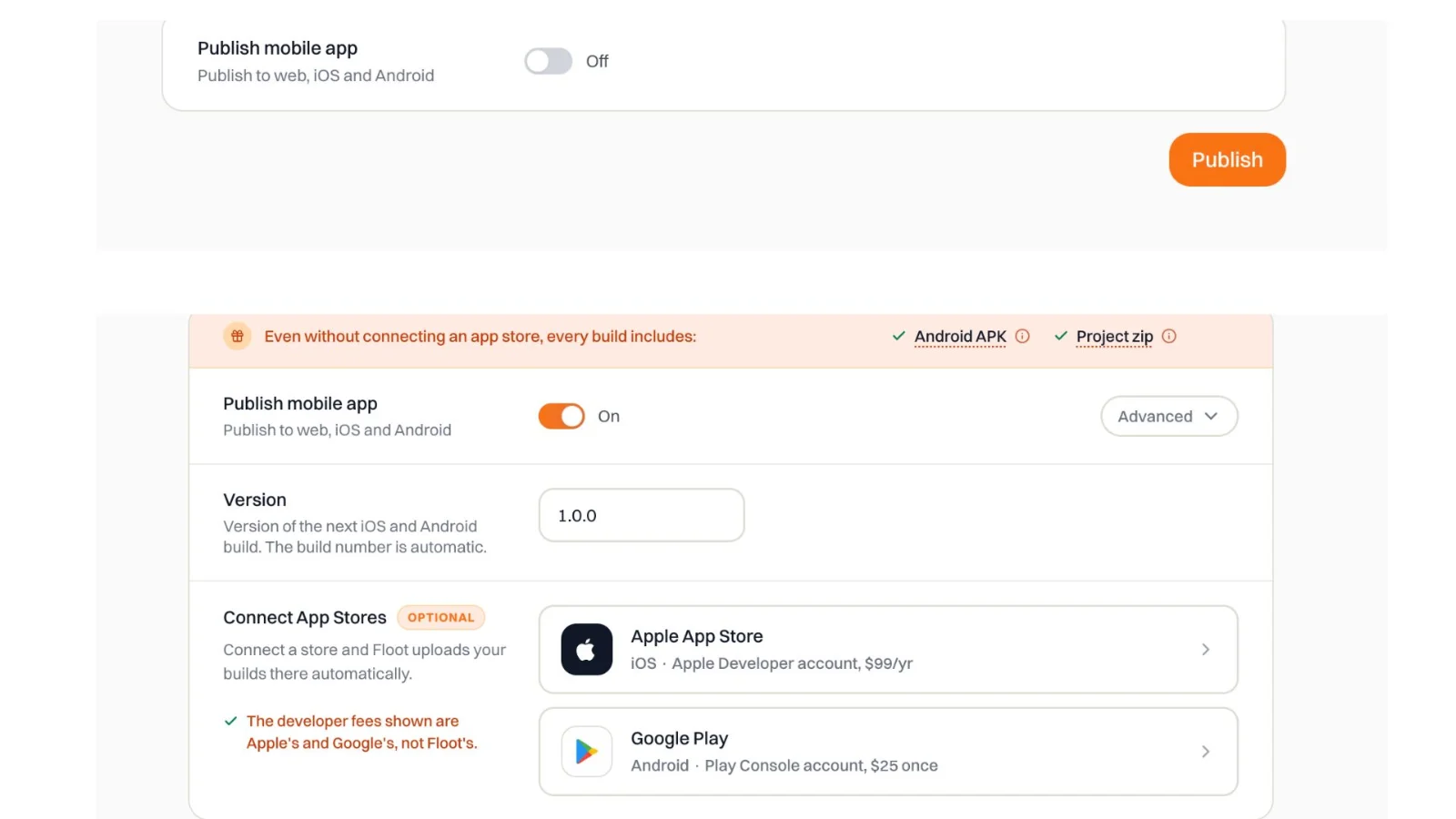
Switching on Publish mobile app shows the version and the app stores. Switching it on does not start a build; clicking the publish button does. The publish screen shows the website and each app build as they run. You can close the tab: publishing carries on in the background.
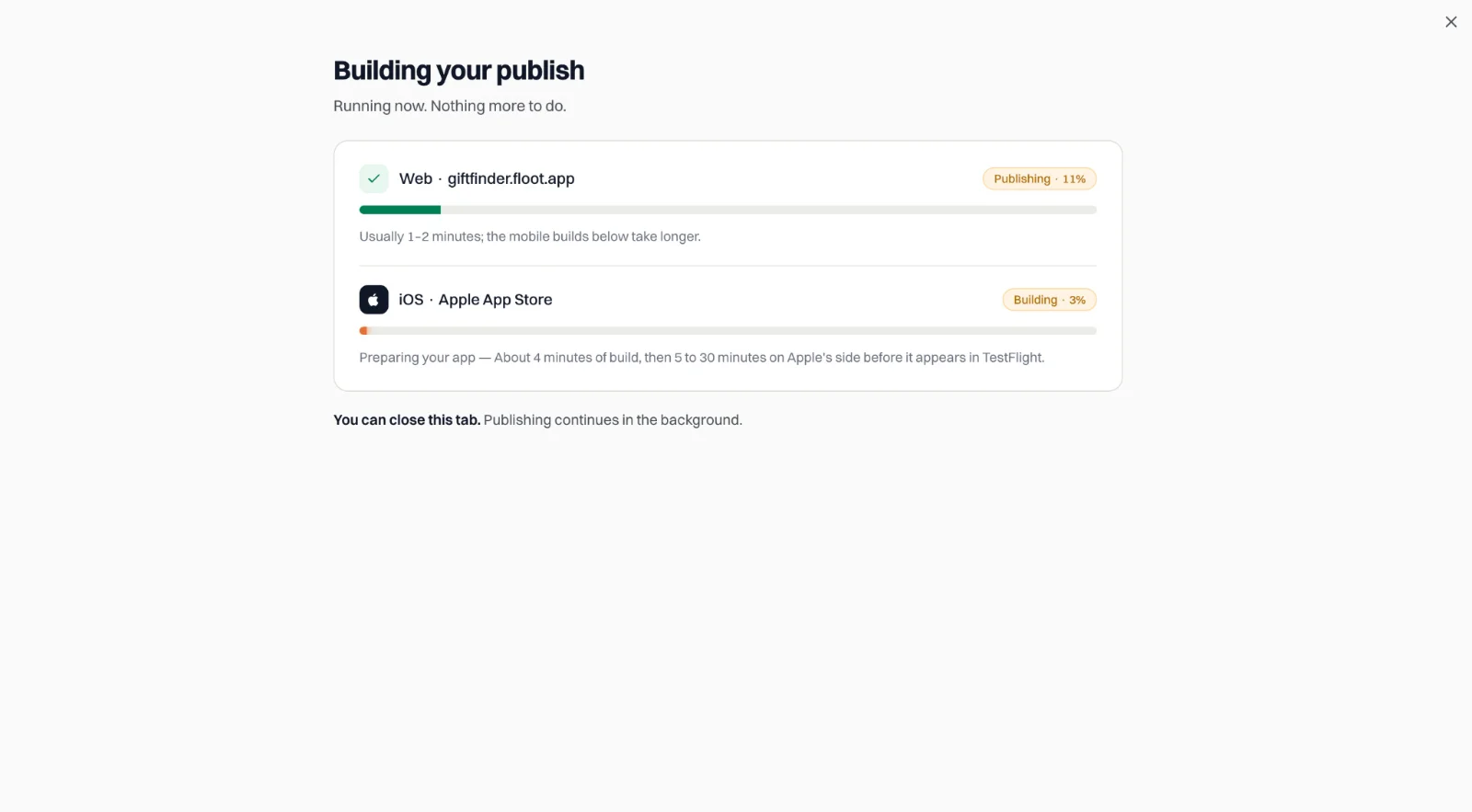
The website usually takes a minute or two. The app builds take longer. The build takes several minutes and appears under Last build when it finishes. On Free and Pro, every app build is opt-in: a publish with the switch off updates only the website, so switch it on each time you want a new app. On Power, once an app store is connected, the switch stays the way you last left it, so every publish rebuilds the app until you turn it off.
- 3
Install or submit
Every build gives you an Android APK, which installs straight from a download link or QR code, and a project zip. Connect your Apple or Google Play account under App stores, and Floot uploads each build to TestFlight or Play internal testing for you — see Publish to TestFlight and Google Play. You only need the developer accounts. You can also use the project zip to build in Xcode and Android Studio on your own machine instead.
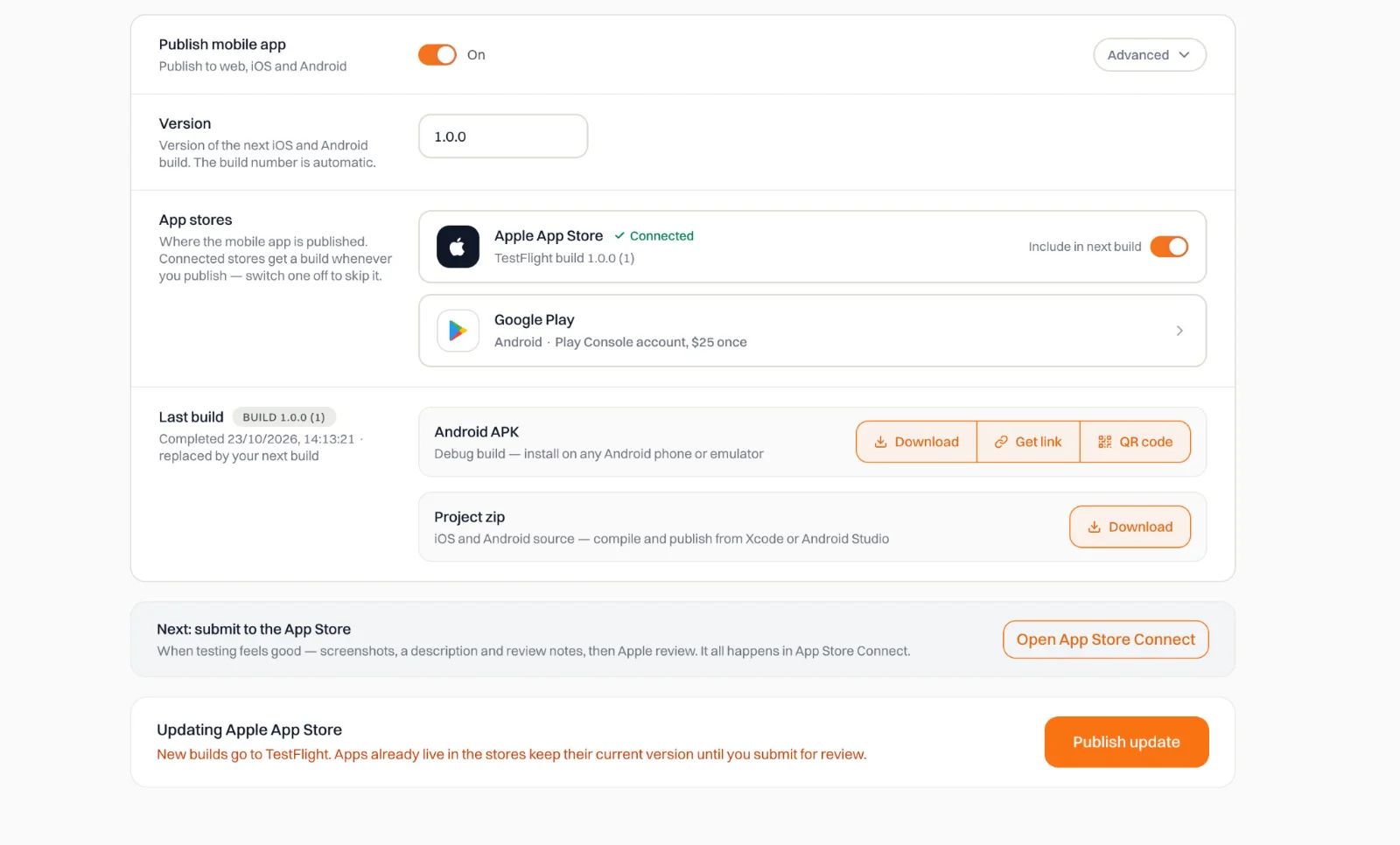
Under Last build: the Android APK, the project zip, and a link to App Store Connect when Apple is connected.
Before you spend a build
Builds are counted each month, so get the app right before you build it. Most of it you can check without a build.
- 1
Check it on an iPhone screen
In your project's preview, open the device menu at the top and choose iPhone. The app runs inside an iPhone-sized screen, and you can tap through it. Adjust spacing, colors, buttons and navigation there until it looks right. None of this uses a build.
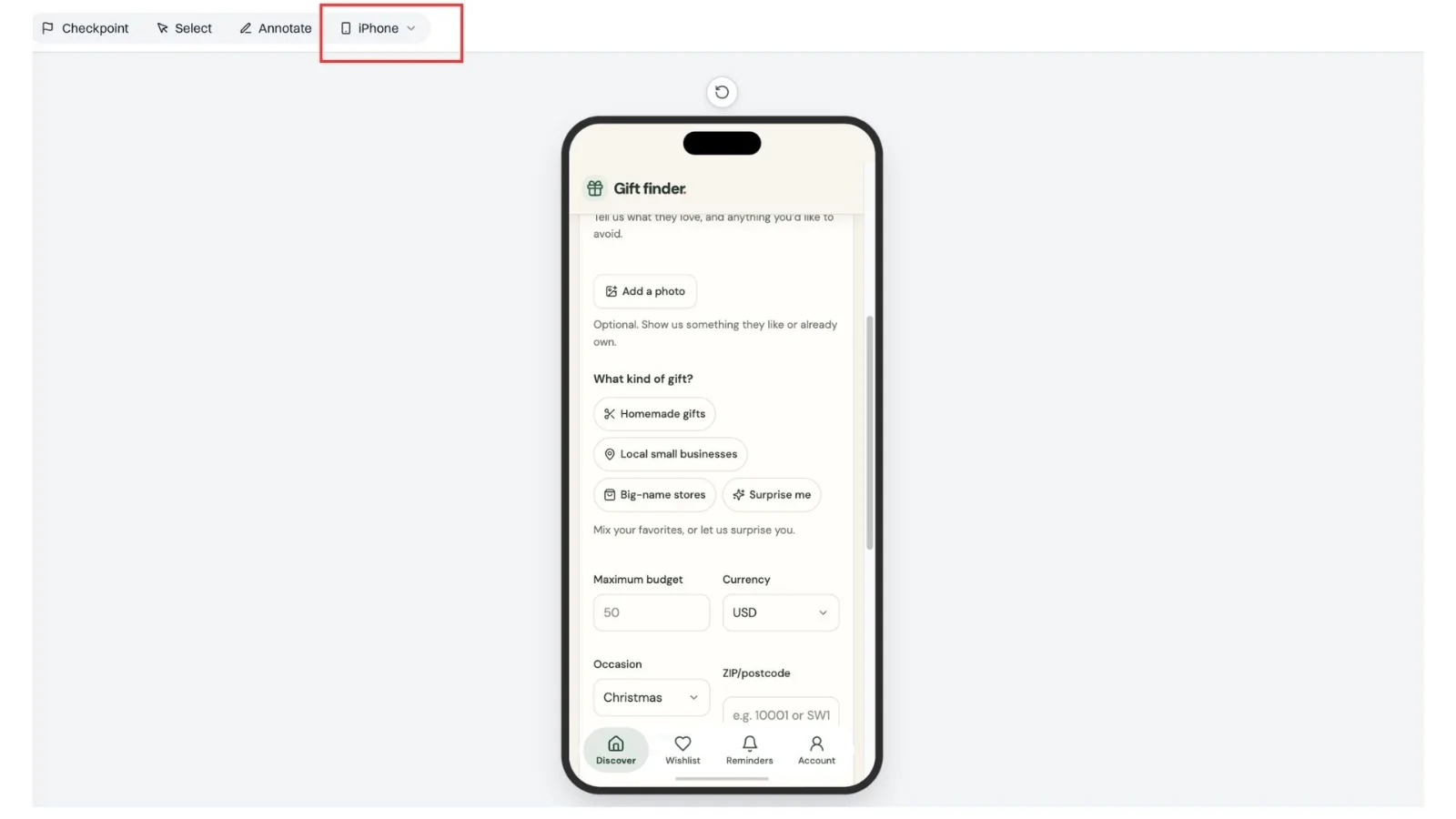
Choose iPhone in the preview's device menu. - 2
Set the icon, splash screen and status bar first
These go into the build, so set them before your first one. Ask your assistant, for example: "Create a 1024 × 1024 app icon in my app's colors, show it to me, and set it as the app icon once I approve it. Don't publish." The same works for a splash screen (a 2732 × 2732 image with the logo in the middle and plenty of space around it, since phones crop the edges) and for a status bar color that matches the top of your app.
- 3
Add the native features you want
Ask for everything you want in the first build, such as location, the camera, sharing or reminders, and test what you can in the browser. See One request for the website and the app.
- 4
Publish the website without a build while you work
With Publish mobile app off, a publish updates only the website and uses no build. Keep it off until you are ready for the phone.
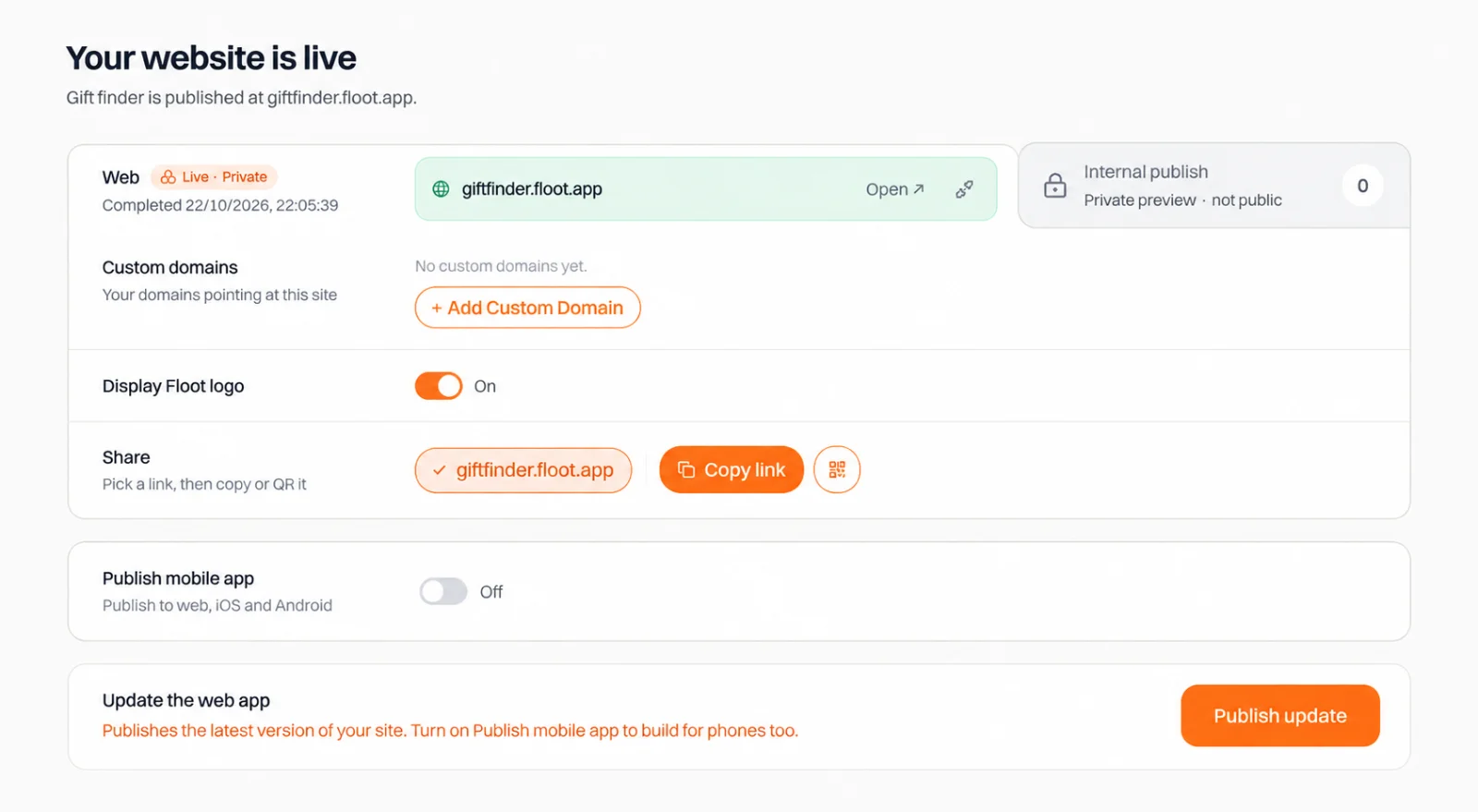
With the switch off, Publish update changes only the website.
The store listing (screenshots, description, keywords and price) is edited in App Store Connect or Play Console and needs no build.
Updating an app people already installed
An installed app does not update by itself when you publish. What a publish reaches depends on what you changed:
| What you changed | How it reaches phones |
|---|---|
| Your backend: endpoints and data | As soon as you publish. The installed app calls your published backend, so no new app build is needed. |
| Pages, screens, styles and text | Only through a new app build. They are packaged inside each build. |
| The native side: plugins, permissions and their wording, the app icon, the version | Only through a new app build. |
To make a new build, publish with Publish mobile app on. A publish with the switch off updates only the website. Then the build has to get to people: testers receive it through TestFlight or Play internal testing, people who installed from a store get it after you submit it for review and release it in App Store Connect or Play Console, and people who installed the APK install the new APK over the old one (if Android refuses, see Installing your Android app). An app already live in a store keeps its current version until you release the new build.
Older builds stay on phones for a while, so keep your backend working for the screens that shipped in them.
Test builds
A test build lets you try your app on a real phone before your changes go live. It builds only the iOS and Android apps. Your website is not published or changed, and you can make one before the app has ever been published, with no subdomain.
- It runs on your preview. The app talks to your project's preview server and preview data, not the published app, so it has your latest changes even if you have not published them.
- It works for 4 hours. The clock starts when you click publish. After that the app shows a message asking you to build again.
- It goes everywhere a normal build goes. You get the Android APK and the project zip, and connected stores get it on TestFlight and Play internal testing.
- It counts as an app build. It uses one of your monthly app builds, like a live build.
- 1
Switch on the mobile app
Open your project on floot.com, click Publish, and switch on Publish mobile app.
- 2
Choose Test
Click Advanced next to the switch, choose Test mode, and confirm. The choice applies to this one build only. The next publish goes back to Live mode by itself.

Live mode builds against your published app. Test mode uses the preview and stops working after 4 hours. - 3
Build
Click the publish button. The build appears under Last build like any other, marked as a test build.
Never submit a test build for review
A test build stops working 4 hours after you make it, so a store reviewer would find a broken app. Your testers also receive it like any other build, so tell them it is temporary. When you are ready to release, publish again with Live selected and submit that build.
Start test builds from the Publish screen
Your assistant cannot start a test build. When it publishes with a mobile build, the build is always live.
Private apps
To give the app only to people you invite, such as your team or a client, publish it from the Internal publish tab with Publish mobile app on. The app asks people to sign in with Floot and opens only for the people on your list. See Private mobile apps.
Platform guides
The developer accounts are yours
Floot builds and submits to TestFlight and Google Play, but the accounts it submits through are yours: you need your own Apple Developer and Google Play accounts, and store review and any publishing support come from Apple and Google.